
MOZA FSR2 Formula Wheel : Test & Review | What it's really worth in 2026
MOZA FSR2 Formula Wheel: My quick review
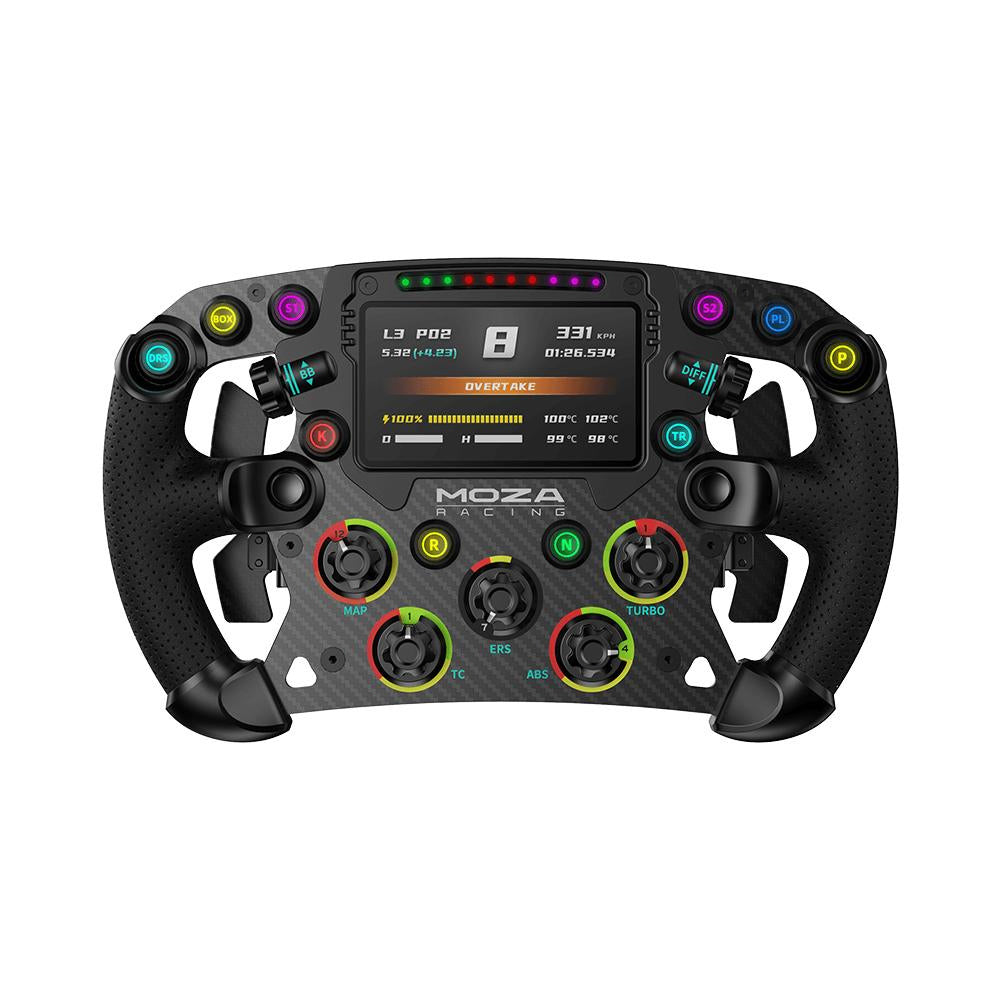
The MOZA FSR2 is a 280-mm F1-style steering wheel designed as a true control center, featuring a 5-mm carbon fiber faceplate, a 4.3-inch touchscreen, and six magnetic paddles. We put it through its paces on a MOZA base, and it holds its own against the market’s premium models without any hesitation. It’s a highly polished steering wheel on its own, designed exclusively for PC use via the MOZA ecosystem. A few concerns remain, ranging from comfort during very long sessions to the lack of SimHub support.
When you buy through our links, we may earn an affiliate commission.
What We Liked
- High-end construction (5 mm carbon fiber, aluminum alloy, microfiber leather)
- Smooth, fully customizable 4.3-inch touchscreen
- Six precise magnetic paddles with an efficient dual-clutch system
- Thumb-operated knobs and dials that are perfect for making adjustments without letting go of the steering wheel
- MOZA wireless quick-release system, compatible with the entire line of in-house bases
- A large number of controls (10 buttons, encoders, two 7-way switches)
Reserves
- Not compatible with SimHub; the display works only through the MOZA software
- Thick rim profile that can cause palm fatigue during very long sessions at high FFB settings
- Printed, non-replaceable button labels
- A dashboard editor with a steep learning curve
- Steering wheel only: A MOZA base (or the Universal Hub Kit) is still required
Technical Specifications
| Type | F1-style steering wheel |
| Diameter | 280 mm |
| Weight | about 1.6 kg |
| Screen | 4.3-inch touchscreen, 480p, 60 Hz, 16.7 million colors |
| Processor | 1.3 GHz quad-core |
| Facade | 5 mm 3K twill carbon fiber |
| Back Cover | aerospace-grade aluminum alloy |
| Handles | perforated microfiber leather |
| Paddles | 6 Hall-effect magnetic paddles, 3-mm carbon grips (shift, dual-clutch, DRS/KERS) |
| Buttons | 10 backlit short-travel buttons |
| Encoders | 2 rotary controls and 3 thumb wheels |
| Switches | 2 7-way switches |
| LED | 10 speed LEDs at the top, 6 RGB signal LEDs |
| Connectivity | MOZA proprietary quick-release system (wireless power and data) |
| Database Compatibility | All MOZA mounts (R3, R5, R9, R12, R16, R21), third-party mounts via the Universal Hub Kit |
A cockpit modeled after a single-seater
We’re used to racing steering wheels that focus entirely on the carbon-fiber look and neglect the essentials. The MOZA FSR2 takes the opposite approach. As soon as you clip it onto the base, you realize it was designed like a real modern F1 cockpit: a 280-mm rectangular rim, a central touchscreen, a forest of buttons and encoders, and six paddles on the back. Nothing is there just to look pretty on a shelf; everything is within easy reach once your hands are in position. It’s this functional approach that, in practice, sets it apart from toys disguised as racing gear.
Carbon fiber, aluminum, and leather: the manufacturing process lives up to its promises
The first thing you notice when you hold it is how rigid it is. The front panel is machined from 5 mm-thick 3K twill carbon fiber, and this isn’t just a marketing gimmick: the structure doesn’t flex, even when you apply strong pressure. The rear shell is made of aerospace-grade aluminum alloy, which explains the modest weight of about 1.6 kg for a device packed with so much equipment. The handles are covered in thin, comfortable perforated microfiber leather that provides a secure grip for the palm, with or without gloves. After several sessions, the finish remains intact and the build quality is flawless. This is a device that exudes industrial seriousness rather than the feel of a gimmick.
There’s just one design drawback worth noting: the button labels are printed and cannot be replaced. On a steering wheel designed to be finely tuned for each game, we would have liked to be able to physically reassign the labels. It’s a minor detail, but it highlights a limitation when switching between different genres.
The 4.3-inch screen: your very own dashboard
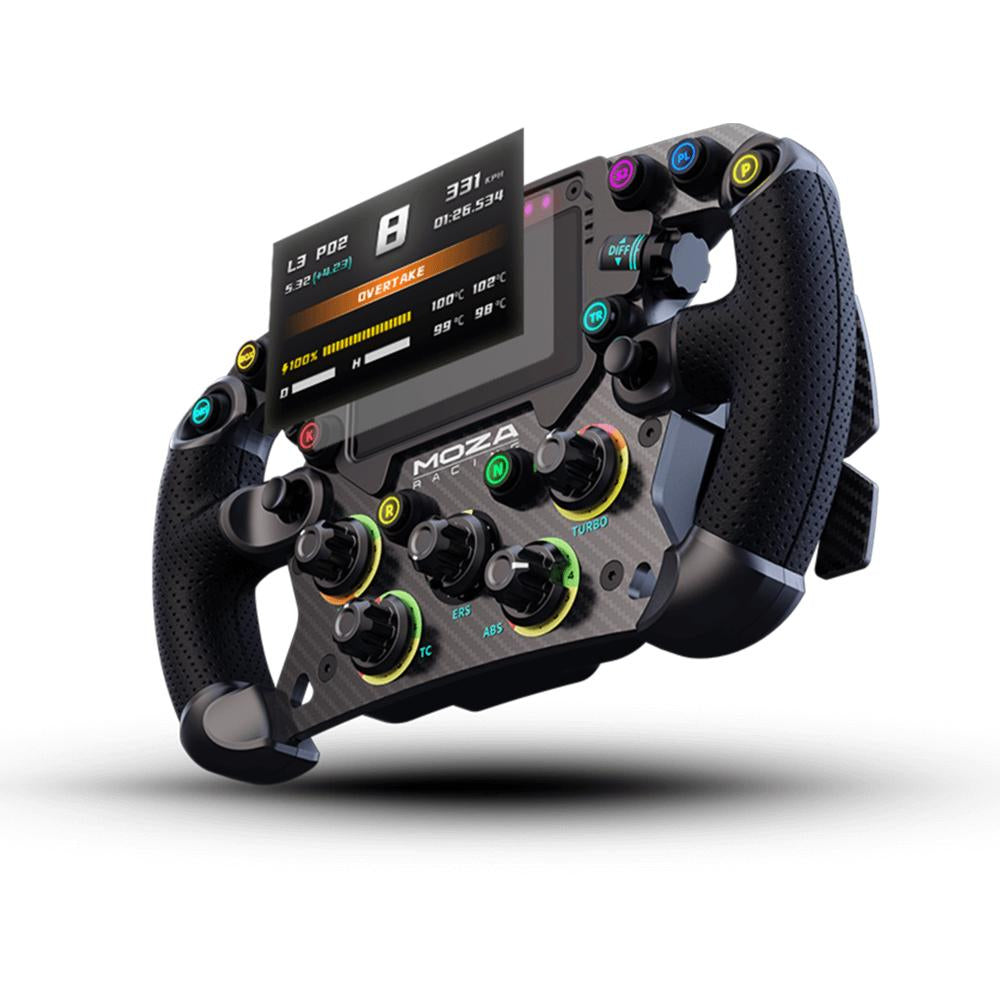
At the center is a 4.3-inch 480p touchscreen, powered by a 1.3 GHz quad-core processor. On paper, the resolution seems modest, but in practice the display is sharp and, above all, smooth: telemetry data scrolls by without any noticeable lag, and the screen remains readable even in the heat of the action. You can switch between layouts on the fly using MOZA’s Pit House software, and that’s where the real value lies. You can customize a dashboard by car category, display tire pressure during endurance races, or show a simple, streamlined tachometer during sprints.
The downside is that getting the hang of the dashboard editor takes some patience. There’s a definite learning curve, and at launch, the community layout library is still quite limited. Once you’ve invested the time to build your own screens, however, there’s no going back.
Six Magnetic Palettes and the Departure Ritual
At the rear, MOZA has gone all out with a system of six Hall-effect paddles, topped with 3-mm carbon grips. Two control gear shifts, two form the dual-clutch system, and the last pair can be freely programmed—typically to activate DRS or KERS. The shift paddles click with a precision that provides a real tactile pleasure, on par with the best models on the market. You can shift through the gears with a crisp, clean motion, without any lag or double-clicking.
It’s when you’re pulling away that the dual-clutch transmission really comes into its own. You fine-tune the slip point with the two large paddles, let go when the light turns green, and immediately feel the benefit of having a system that’s so responsive at your fingertips. For anyone working on their starts in road racing, it’s a real advantage that translates into gaining positions in the first turn.
On the Track: Adjusting Without Ever Letting Go of the Steering Wheel
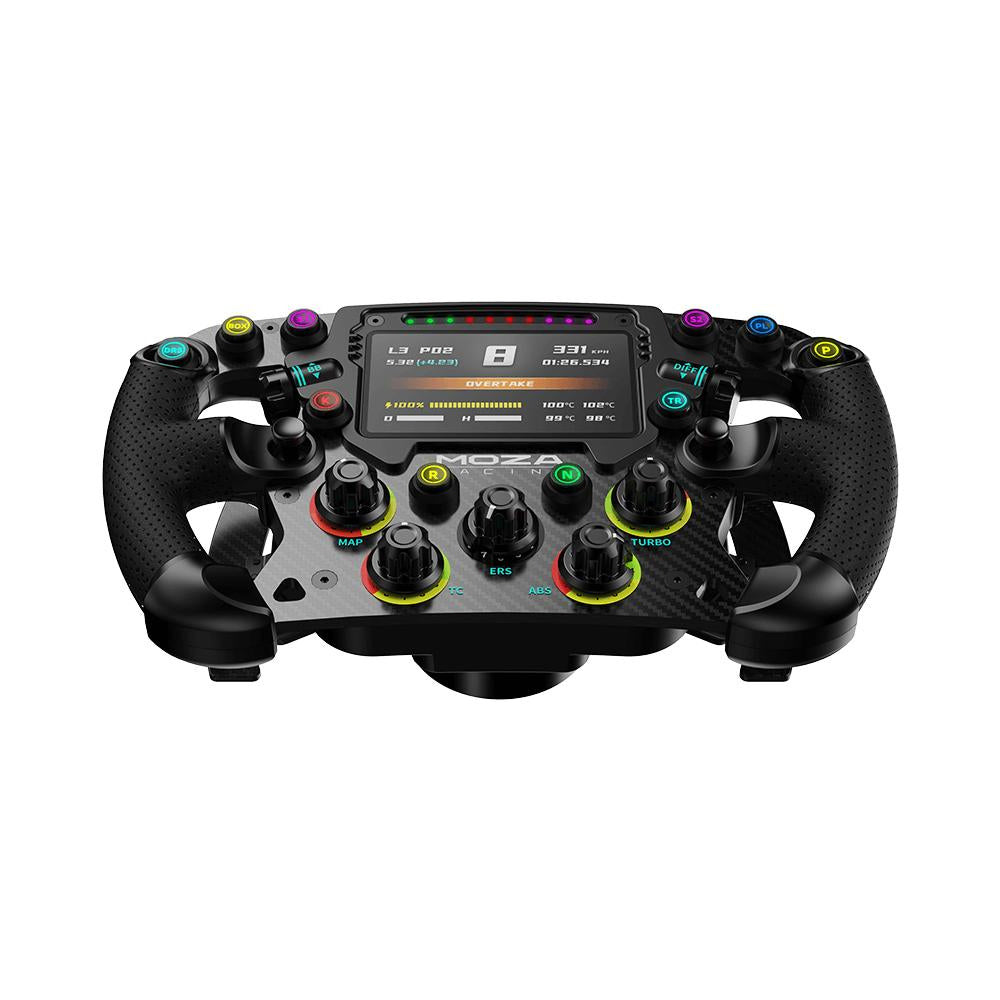
The true luxury of the FSR2 is revealed in the heat of the action. It features ten backlit short-travel buttons, two 7-way switches for navigating menus, clickable rotary encoders, and thumb wheels. In practice, you can adjust the brake bias as you enter a rapid sequence of turns with a simple press of the thumb, without moving your hands or taking your eyes off the track. You can adjust the ERS setting or ABS value coming out of a turn with the same ease. After a few days, the control layout becomes second nature, and you stop even thinking about it.
We ran the whole setup on a MOZA direct-drive base, and the combination works well together. The force feedback transmits cleanly through the rigid rim: differences in surface texture—such as the transition from asphalt to grass—are clearly distinguishable, and firm contact is felt in the arms without any unwanted damping. The rim doesn’t distort the signal; it transmits it faithfully.
Long-term comfort: the only real concern
It’s during very long sessions that the FSR2 shows its limitations. The grip profile is rather thick, and at high force feedback settings, you may experience discomfort in your palms after about thirty minutes of continuous use. This isn’t a deal-breaker for quick sessions or short races, where the grip remains comfortable, but those who enjoy endurance sessions lasting two or three hours straight will have to adjust to this substantial design. The microfiber leather also requires regular cleaning to stay looking fresh.
Compatibility and Ecosystem: Think PC
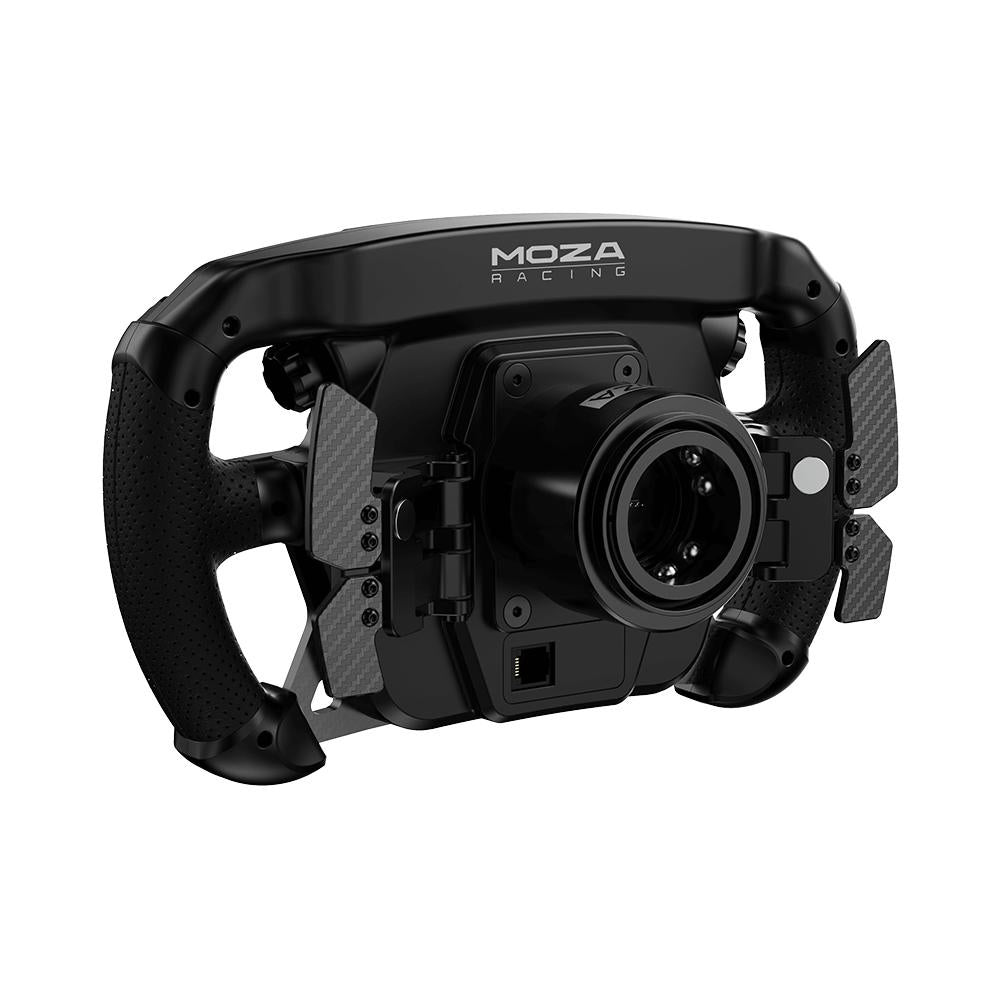
The FSR2 clips onto MOZA’s proprietary quick-release system, which transmits power and data wirelessly, without any unsightly coiled cables. It is natively compatible with the entire range of MOZA bases, from the R3 to the R21, including the R5, R9, R12, and R16. To use it with a base from another brand, you’ll need MOZA’s Universal Hub Kit. It acts as a PC controller within the MOZA ecosystem: console compatibility depends entirely on the base you’re using, so be sure to check this based on your setup before purchasing.
Another limitation to be aware of: the display works exclusively with MOZA's proprietary software and is not compatible with SimHub. For some pilots who are used to this tool, this is a significant drawback.
Our verdict after testing
The MOZA FSR2 easily takes its place at the top of the pack among Formula racing wheels. With top-notch build quality, a smart and customizable display, responsive magnetic paddles, and a plethora of controls accessible in the heat of the action, the whole package forms a cohesive and rewarding cockpit experience. Its flaws—such as comfort that could be improved during endurance sessions, the lack of SimHub support, and fixed button labels—are all the easier to overlook given that it goes head-to-head with more expensive industry leaders. For a PC racer immersed in the MOZA ecosystem, this is one of the most polished formula steering wheels available today.



Reviews